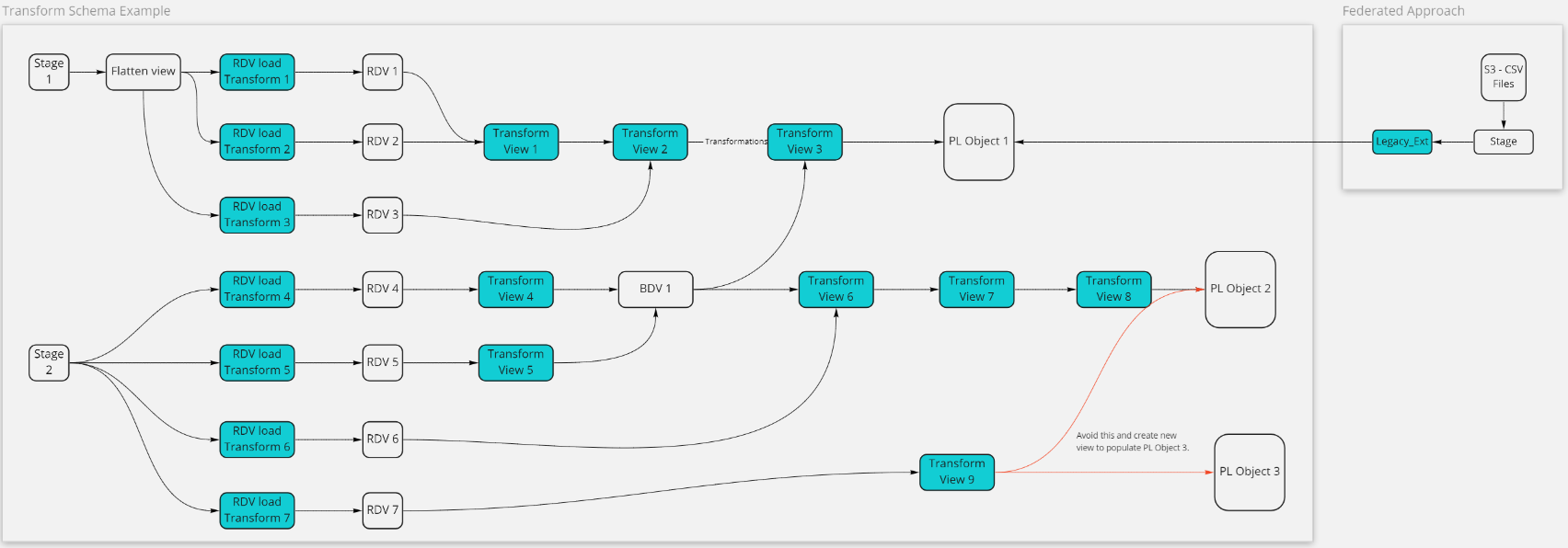
The data modelling standards for the usage of the Transform Schemas in Aspire. This page is to document the standards and principles to be followed for the Transform Schema:
Principles
The schemas should solely be used for views and tables created to simplify the logic of Presentation Layer objects - the BDV transformation logic may also be included in this area
Example objects created here - if there is complexity in a pipeline, objects may be created to simplify the pipeline (such as breaking into smaller steps of multiple views). Also enables the persistence of a result set as a table (by exception) which is part of internal data pipeline working and not to be presented to users i.e. if a number of builds rely on the processed data (so differs to the BDV REP object)
Objects created in this schema are not accessed/presented to business users. Also, this schema should be created to hold any temporary objects and be used only for transformations
IRM specific transform schemas are created.
Responsible/Accountable - Entire squad. Data architect is still accountable for the source to target mapping
Engineering team will understand the details from mapping specs and depending on their way of implementation, will execute the transformations
No Consuming Business User Access (e.g. data science, analytics). Use cases where access may be required is to support the internal transformation of data between the RDV, BDV and PL - in which case these schemas and data definitions should suffice (abstracting the internal transformations being performed away from the user)
Purpose and Usage of Transform Views
Views are created in Transform Schema while data is moved from one layer to another layer in Snowflake.
Tables are not to be created explicitly in transform schema. Tables are allowed to be used inside the procedure, but only as either temporary or transient. Either ways they have to be explicitly dropped at the end of procedure execution
Views are used to capture business logic from base tables and fed into target objects. If in case processing is iterative and complex to capture in views, then procedures are recommended
Views can be nested. Separate naming conventions are followed to identify nested and non-nested views
We can use same views to populate multiple target objects. Care to be taken while creating these views as changing any of the target objects may invalidate the views. So we need to refresh these views whenever we change the target objects. As we cannot have the target object name in the view, we use the Generic as prefix and other parts of naming standards remain the same
While using procedures, care to be taken to create optimised procedures and reviewed completely. Please make sure to maintain one to one relationship between procedure and target objects (i.e.) a procedure A should access/feed only to target object Z and not multiple objects
Dynamic SQL objects can be created in transform schema only for database object creation and not for business data validation
Every view or procedure should carry proper snowflake tags.
Creating views which refers to other objects in transform schema is not recommended. Instead, we can create views which refers to one or more target tables and use these views to insert into multiple target tables. Please refer to scenario 6 for more explanation
Example Data pipeline
Naming Standards
Below are some scenarios and suggested object naming standards
Scenario 1: Single view created in transform schema to an object in target layer
<process or project>_<target layer>_<target layer object name>
For example: MSBO_PL_FACT_ARGOS_PO
Target layer is PL and Target Object is FACT_ARGOS_PO
<process or project> is optional.
Scenario 2:
Multiple views created in transform schema to process various business processes, independent from each other, which are used to create an object in target layer
__ Assume that there are four business processes viz STORE_WASTAGE, STORE_RECYCLE, STORE_INSTOCK, STORE_TRANSFER and these are sourced from different files, for which views are created in transform schema with relevant transformations The transform views are named as * STORE_WASTAGE_PL_FACT_WASTAGE_RECYCLE_STOREWISE * STORE_RECYCLE_PL_FACT_WASTAGE_RECYCLE_STOREWISE * STORE_INSTOCK_PL_FACT_WASTAGE_RECYCLE_STOREWISE * STORE_TRANSFER_PL_FACT_WASTAGE_RECYCLE_STOREWISE The above views are combined to create the target view as follows Target layer is PL and Target Object is Fact_Wastage_Recycle_Storewise If for a process STORE_WASTAGE, we receive two files of same structure from difference sources at the same time, we first union the data into the view STORE_WASTAGE_PL_FACT_WASTAGE_RECYCLE_STOREWISE from the base staging tables and then proceed with the rest of the processes. If they are of different structure, then we maintain as separate views, by numbering them as follows STORE_WASTAGE_PL_FACT_WASTAGE_RECYCLE_STOREWISE_01 STORE_WASTAGE_PL_FACT_WASTAGE_RECYCLE_STOREWISE_02 In case if they appear at different times, then we maintain same view if structure is same and create different views if they are not of same structure. **\<process or project\>** is optional. **Scenario 3:** Multiple views created in transform schema to process various business processes, out of which some DEPENDENT on each other and some are independent and these views are used to create an object in target layer. In this scenario, where nested views are involved, we use sequence numbers as follows \<process or project\>\_\<target layer\>\_\<target layer object name\>\_\<NNx\> where NN is any sequence numbers and x is optional character Assume that there are six views created as follows * STORE_PL_FACT_STORE_OUT_REORDERSTOCK_VENDOR_01a * STORE_PL_FACT_STORE_OUT_REORDERSTOCK_VENDOR_01b The above two views are union-ed to create the third view called STORE_PL_FACT_STORE_OUT_REORDERSTOCK_VENDOR_01 Similarly, * STORE_PL_FACT_STORE_OUT_REORDERSTOCK_VENDOR_02a * STORE_PL_FACT_STORE_OUT_REORDERSTOCK_VENDOR_02b The above two views are union-ed to create the sixth view called STORE_PL_FACT_STORE_OUT_REORDERSTOCK_VENDOR_02 Now, STORE_PL_FACT_STORE_OUT_REORDERSTOCK_VENDOR_01 and STORE_PL_FACT_STORE_OUT_REORDERSTOCK_VENDOR_02 are used to create the main target view Target layer is PL and Target Object is FACT_STORE_OUT_REORDERSTOCK_VENDOR **\<process or project\>** is optional. **Scenario 4:** Single procedure is used to populate the target object Naming convention used is \<process or project\>\_\<target layer\>\_\<target layer object name\> For example, MSBO_PL_FACT_ARGOS_PO Target layer is PL and Target Object is FACT_ARGOS_PO **\<process or project\>** is optional. **Scenario 5:** As we have recommended that a single procedure can map to only one target object, in order to target multiple objects from a procedure, we can create a parent procedure which will call multiple child procedures and each child procedure will populate a target object. In this case, the parent procedure will carry the word Generic and prefixing or suffixing the project or process name becomes mandatory so that everyone can understand that this is used for a particular process or project. Using the above information, naming standards can be illustrated as follows: Assuming name of the project is Reorder Level Updates, RDV is the target layer, RDV1, RDV2, RDV3, RDV4 are the target object names. The name of the main procedure will be Generic_ReorderLevelUpdates, which will call the following four child procedures each for a target object. * RDV load transform for RDV1 can be named as ReorderLevelUpdates_RDV_RDV1 * RDV load transform for RDV2 can be named as ReorderLevelUpdates_RDV_RDV2 * RDV load transform for RDV3 can be named as ReorderLevelUpdates_RDV_RDV3 * RDV load transform for RDV4 can be named as ReorderLevelUpdates_RDV_RDV4 As it is acceptable for a single view to populate multiple target objects, this scenario, when implemented using views, will have Generic_ReorderLevelUpdates_View. If, the scenarios complicate further, we are leaving the options to the engineers/architects to differentiate their names so that everyone can understand the objects **Scenario 6:** Single view is created in transform schema, which includes all the information from source. From this view, we can create multiple views, each depicting a business logic as illustrated below. Assume that target layer is PL and name of the tables are Fact_Transfer_Supplier_Items_History and Fact_Transfer_Supplier_Items_Daywise and name of the project is FDD. The view created from source is FDD_PL_Fact_Transfer_Supplier_Items_History_01 Multiple views created from this view are FDD_PL_Fact_Transfer_Supplier_Items_History_01_02a FDD_PL_Fact_Transfer_Supplier_Items_History_01_02b FDD_PL_Fact_Transfer_Supplier_Items_History_01_02c FDD_PL_Fact_Transfer_Supplier_Items_History_01_02d All the above views are in transform schema. Now we create another view which will be the union of these individual views as follows FDD_PL_Fact_Transfer_Supplier_Items_History_03 = FDD_PL_Fact_Transfer_Supplier_Items_History_01_02a UNION FDD_PL_Fact_Transfer_Supplier_Items_History_01_02b UNION FDD_PL_Fact_Transfer_Supplier_Items_History_01_02c UNION FDD_PL_Fact_Transfer_Supplier_Items_History_01_02d The final view FDD_PL_Fact_Transfer_Supplier_Items_Daywise_04 is the difference (Minus) between FDD_PL_Fact_Transfer_Supplier_Items_History_03 and Fact_Transfer_Supplier_Items_History **\<process or project\>** is optional. # Implications None.