Scratch Schema
urn:js:virtue:aspire:pattern:.
TL;DR
The SCRATCH.WORKSPACE schema is granted to all roles. This is a place for experimentation, and trial where you can create objects without worrying about permissions. Old objects will be regularly dropped with garbage collection.
Instructions
- The
SCRATCH.WORKSPACEarea is NOT for production data. If your data needs to be stored for a long term, or loss of the data would be a critical issue, theSCRATCH.WORKSPACEarea SHOULD NOT be used.- You should use a permanent data storage location for any critical data. If you do not have one, please speak to the Data Modellers for your area, and then raise a DOSSD ticket.
- Objects created in this schema will only be usable by the role that was used to create them (or another role that inherits the creating role). See here for a more detailed explanation.
- Even though you may not be able to see other objects in the schema, new objects can still clash in terms of names. It is therefore encouraged for you to prefix your tables to make their name more unique. If this occurs you will likely receive an error like:
“SQL compilation error: Table ‘ALL_ROLES’ already exists, but current role has no privileges on it. If this is unexpected and you cannot resolve this problem, contact your system administrator. ACCOUNTADMIN role may be required to manage the privileges on the object.”
- Requests for access on objects in the
SCRATCH.WORKSPACEarea to be expanded will be denied. - Support requests related to the
SCRATCH.WORKSPACEarea will be denied. This is a workspace area only. - The
SCRATCH.WORKSPACEschema is a transient schema, meaning that the time travel for objects created here is 1 day, and there is no fail safe period. - Objects created in the
SCRATCH.WORKSPACEarea are valid for 30 days by default. After 30 days they are liable for auto-deletion. The exception to this rule is where objects are tagged with the ACCOUNT_OBJECTS.TAGS.EXPIRY_DATE tag:- The EXPIRY_DATE tag can be used to extend the duration of an object.
- EXPIRY_DATE values greater than 90 days in the future will be re-set to 90 days. This is to prevent unreasonable object lifetimes being implemented.
- If you need to extend the lifetime of an object beyond 90 days, you may extend the EXPIRY_DATE tag at any time, provided that the expiry_date is never more than 90 days in the future.
-
The EXPIRY_DATE date tag can be set using:
alter table scratch.workspace.long_lived_table set tag account_objects.tags.expiry_date = '2021-10-02';- The date provided in the tag must be of the form YYYY-MM-DD
Appendix
SCRATCH.WORKSPACE Permissions Explained
The SCRATCH.WORKSPACE schema is a MANAGED ACCESS schema, this means that the SCHEMA OWNER controls the permissions on tables and other objects in the SCHEMA after they have been created. The table owner (creator) is unable to grant the schema to other users. You can read more about MANAGED ACCESS schemas here.
In practice, what does this mean? It means that tables that you create in this schema are only readable by the role that was used to create it.
The diagram below illustrates two roles (Role 1 & Role 2), which have created tables within the SCRATCH.WORKSPACE schema:
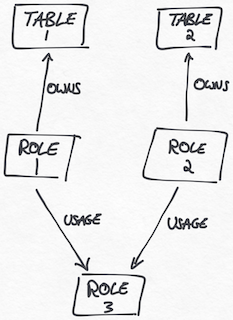
There is a 3rd role, Role 3, which has been granted usage of Roles 1 and 2.
In this scenario, the following permissions apply:
| Role | Table 1 | Table 2 |
|---|---|---|
| 1 | :white_check_mark: | :x: |
| 2 | :x: | :white_check_mark: |
| 3 | :white_check_mark: | :white_check_mark: |