Stub Hub
urn:js:virtue:aspire:proposal:9.1
TL;DR
Stub a Hub –> Allow Hubs to be populated by all squads.
Rational
Hubs are defined using a unique list of business keys and provide a soft-integration point of raw data that is not altered from the source system, but is supposed to have the same semantic meaning.
Currently the Hubs are owned and populated by relevant squads. Due to this, if there are missing identifiers for the Hub (Example: Due to late arriving data) from different squad then they are missing in the Hub.
Because of the missing identifiers in the Hub, the same are missing in the dimensions in Presentation Layers. This lead to the missing data while joining the Facts with the Dimensions.
Microstrategy by default uses inner joins between tables, as a result the total provided will vary from one query to another for the same dataset if referential integrity is not maintained.
Example: If the Product identifiers in Product dimension are missing for which there is a Sales in the Sales Fact then we will potenitially report wrong Sales totals.
Documentation
This page sets out a proposal to allow all the squads to write into all the Hubs. This will help have all the data integrated in the Raw Data Vault and avoid from missing the data in the Presentation Layers. Also this will help us use inner joins instead of left outer joins which will improve the query performance in Snowflake.
Proposal
As part of the design investigation there are three potential approaches for resolving this challenge.
Approaches
Approach 1
Overview: Allow all squads to populate all Hubs
Pros
- PL dimensions will have all keys, allowing inner joins.
- No additional effort for the owning squad
Cons
- There may be a lag in the additional fact-generated keys appearing in the PL depending on the owning squad publication frequency.
- Invalid keys may be inserted.
- Additional effort as each non-owning squad must add additional insert logic for each relevant hub.
Approach 2
Overview: Allow all squads to populate all Hubs but only via an intermediate/stage area.
- Only the squad which owns the Hub can populate the Hubs
- Non Hub owner squad need to push the data into an intermediate/stage area, from where the owning squad will pick and load into the Hub
- Does it need any Engineering tasks? Will it be complex?
Pros
- PL dimensions will have all keys, allowing inner joins.
- Owning squad may be able to vet the suggested keys to see which ones are valid
Cons
- There may be a lag in the additional fact-generated keys appearing in the PL depending on the owning squad publication frequency.
- Invalid keys may be inserted.
- Additional effort as each non-owning squad must add additional insert logic for each relevant hub.
- Owning squad has extra effort to examine the intermediate/staging area.
- There are technical challenges as well around this approach. Example: Supply Chain squad has their own RDV, BDV schemas
Approach 3
Overview: Don’t allow Stub Hub.
Pros
- Only valid keys are inserted.
Cons
- PL dimensions will not necessarily have all keys, requiring outer joins.
- We will potentially miss data while joining tables.
Recommendation
After speaking to various stakeholders which includes Data Architects, Engineering Managers, Data Quality Team it was recommending to go with Approach 1 due to the simplicity of implementation.
Principles
- Data published into the PL must use the identifiers from the Hubs.
How to implement Approach 1?
- Squad A owns Hub 1. With this Approach all the squads should be able to load into Hub 1.
- Squad B want to load a new feed which contains a key present in Hub 1.
- Squad B implements pipelines which insert any missing identifiers.
- Squad A runs regular checks on the Hub to capture anamolies.
Benefits
With
- Performance improvements.
- Hub will have the full list of keys.
- No data will be missed while the Facts and Dimensions are joined together.
Without.
- Cannot capture the full list of business keys in Hubs
- Late arrival of dimension data scenario is not handled.
- Performance challenges as we have to use left outer joins to join the facts and dimension tables.
- Data might be missed while joining the tables.
Questions
Who owns the correction of the data?
- The team who writes the data into the Hub will be the owner for correction of the data. The owner can be identified by the technical columns (Example: SOURCE_SYSTEM_CD) present in the table.
What do we do with the indentifiers for which there is no reference data?
- For such indetifiers the reference data in Dimensions is set to Unknown. When the reference data comes in the future then it will be made available in the Dimension.
- There is a plan in the future for Snowbocrop to run the checks to capture the data that has no reference data. And to publish the details to the relevant squad.
What is the escalation process for getting the source system corrected?
Standard DQ processes apply. Responsibility for raising issues sits with the owner of the Hub or if poor quality data is being added by another team then they may be required to address the issue.
Who monitors all of this?
- Monitoring data quality is a combined responsibility between the team owning the Hub and the Data Quality team.
- Snowbocrop should provide functionality to enable this process.
Additional Information with examples
Hub Overview
Hubs are defined using a unique list of business keys and provide a soft-integration point of raw data that is not altered from the source system, but is supposed to have the same semantic meaning.
The Hub tracks the arrival of new business keys into the Raw Data Vault. A Hub can be populated from different source systems and they can be tracked by the metadata SOURCE_SYSTEM_CD and the load /effective datetimestamps.
Example
A sample example details how a Hub is populated. In the following example we are having 3 source systems from where we receive the Store information.
- Source 1 → This is the Store Information where the Stores are created and will contain details like Store Name, etc.
- This will populate STORE_HUB & STORE_R09STR_SAT
- Source 2 → This source captures the hierarchy of the Stores
- This will populate STORE_HUB & STORE_HIERARCHY_LINK
- Source 3 → This source contains the Sales Transactions that happened at a Store for a particular day
- This will populate SALES_TRANSACTION_HEADER_LINK
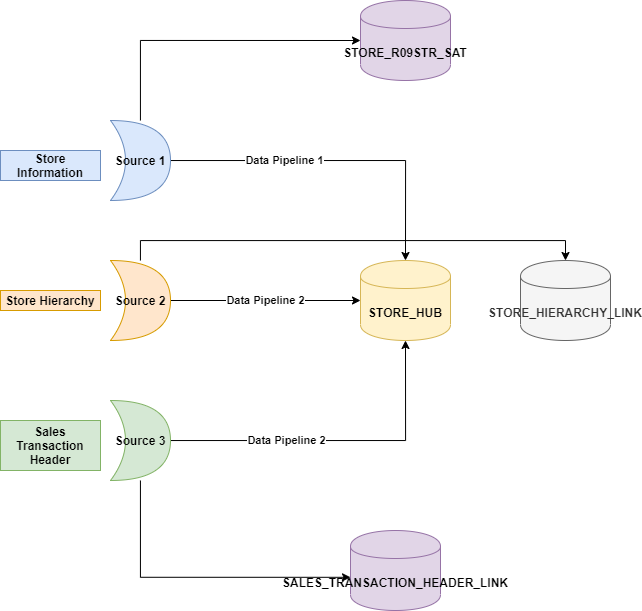
Stubbing a Hub
In the above example, we might receive the Store Business keys from all the source systems. And it is possible that all the Sources might not have got the complete list of Store numbers.
In such scenario, which ever source sees a new Store number first will insert the record into STORE_HUB.
So what is Stubbing a Hub?
Source 3 contains the Sales Transactions details and it captures Store numbers alone and not any other reference data related to Stores. If we see a new Store from this source (where it doesn’t contain any reference data related to that Hub) and we decide to insert that Store into STORE_HUB then we call this as Stubbing a Hub.
Benefits of Stubbing a Hub
- Have the full list of Business keys in the Hub
- Late arrival of dimension data scenario is handled
- Helps to use inner joins between Facts & * Dimensions in PL instead of outer joins. This leads to performance improvements
Challenges with Stubbing a Hub
The following diagram highlights how different tables in RDV can be owned by different squads.
- Strawberry Squad owns STORE_HUB, STORE_R09STR_SAT, STORE_HIERARCHY_LINK
- Kiwi Squad owns SALES_TRANSACTION_HEADER_LINK
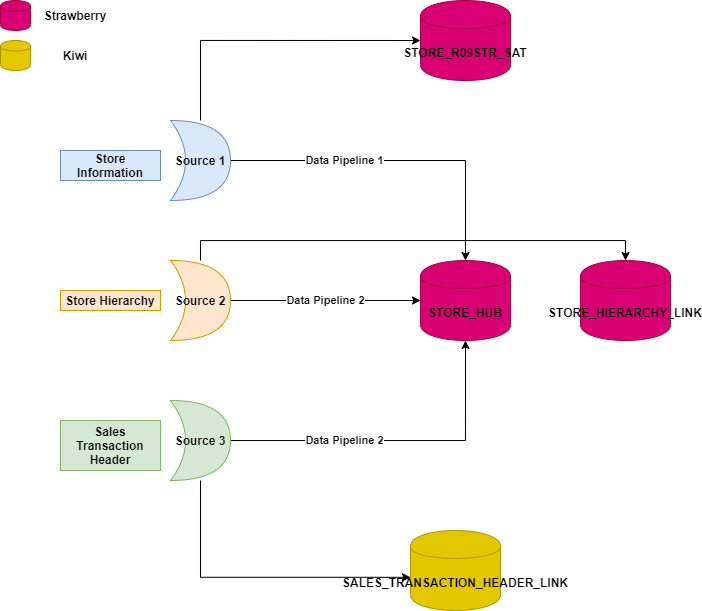
With the breakdown of the squads based on IRM, different hubs are owned by different squads. This lead to the challenge if a squad can stub into another squad’s hub.
Implications
- No ownership for the hubs
- Data inconsistency if the sources are not real sources for the hubs
- Dependencies between Data Pipelines