Logical Data Model Standards
urn:js:virtue:aspire:standard:21.1
TL;DR
The standards to be followed by Data Architects when creating the Logical Data Model. The Logical Data Model is used to document the Entity, Attribute and Relationship requirements in enough detail to enable the production of a Solution Data Model.
Definition
The Logical Model is not physicalized but it will be used:
- During project delivery to test that each of the changes made to this model represent a business requirement and ensures each change has been reflected in the structure and mappings into the Solution Data Model.
- Is a structured and unambiguous notation to use when speaking to business customers about the data we hold within ASPIRE.
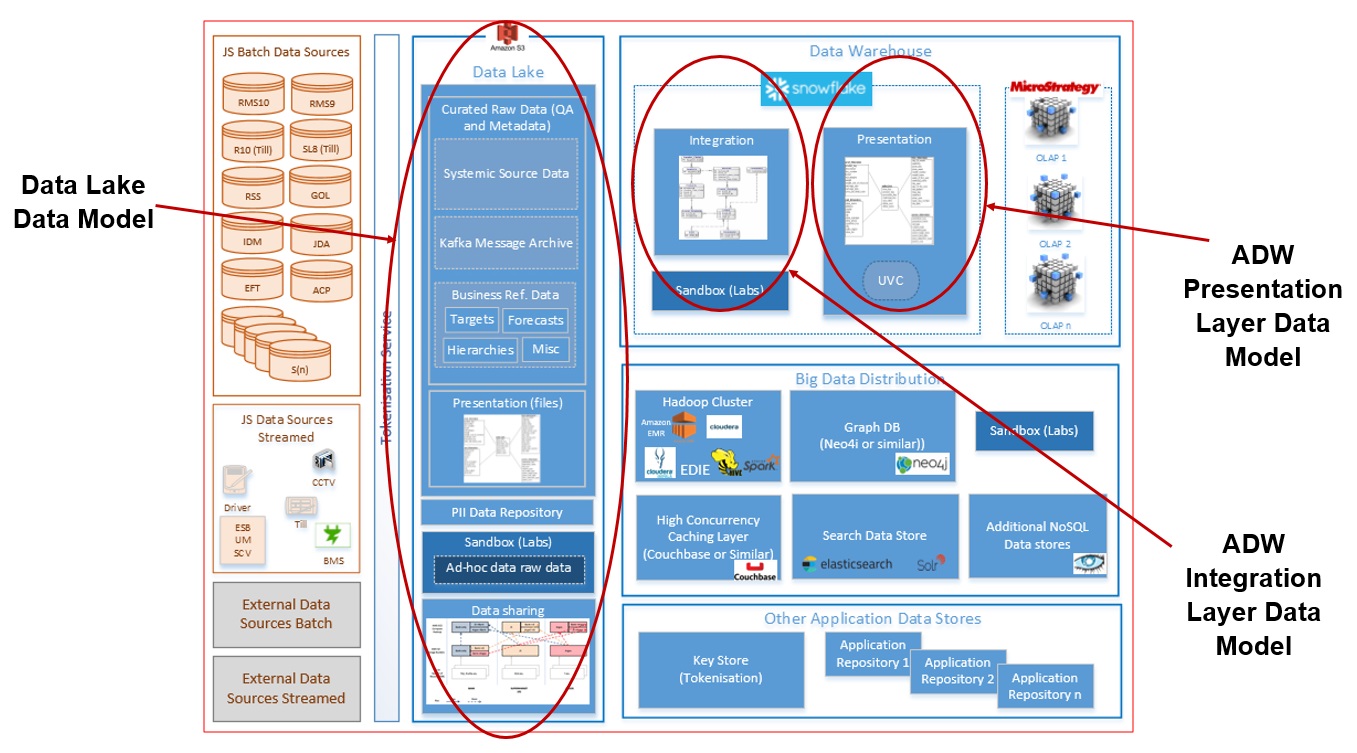 Figure 1: Use of the L4 Logical Model
The standards for the LDM are detailed below. The naming convention for each standard follows this approach:-
Example, LGE-1 means
- L denotes the Logical Data Model,
- GE denotes the General section, and
- 1 is the number of the standard.
The shortcut used is clearly indicated in the section names below.
General (GE)
| Standard | Overview | Detail |
|---|---|---|
| LGE-1 | The LDM is a Logical data model only. | No physical data model is required. No physical attributes like PROCESS_ID are required. |
| LGE-2 | The LDM will be a standalone model. | The data model will be used to feed requirements into other data models, specifically the PDMs, however new requirements will not be forward engineered from the LDM to the PDMs. |
| LGE-3 | The LDM will be modelled using 3NF notation. | 3NF gives the data modeller the most flexibility to accurately represent the requirements. And as this is a LDM only the choice of 3NF does not have any implementation or usage impacts. |
Entity Relationship Diagrams (ER)
| Standard | Overview | Detail |
|---|---|---|
| LER-1 | Each Subject Area will contain an overview Entity Relationship Diagram. | To aid readability of the Subject Area, the overview Entity Relationship Diagram will contain all Entities and Relationships owned by the Subject Area, and other Entities that have a relationship to the owned Entity. |
| LER-2 | Subject Area and Entity Relationship Diagrams will be named consistently. | The name of the Entity Relationship Diagram must match the Subject Area. |
| LER-3 | Lower level Entity Relationship Diagrams may be introduced if the level of details warrants a separate diagram. | The goal is to limit the number of Entity Relationship Diagrams, so a sub diagram should be agreed with the Lead Data Modeller in advance. |
| LER-4 | Any content of lower level Entity Relationship Diagrams must also be present in the overview Entity Relationship Diagram. | This will ensure there is a single overview of the Subject Area. |
| LER-5 | Entities will be coloured to make it easy to identify the most important elements of the diagram. | All entities owned by the current Entity Relationship Diagrams will have the same background colour that is different to all other Entities that are owned by other Subject Areas. |
Entities (EN)
| Standard | Overview | Detail |
|---|---|---|
| LEN-1 | An Entity will represent a business concept or activity. | The Entities will be things or services within the business, for example a Store or a Food Item. They will also represent business activities, for example Online Payment. |
| LEN-2 | Each Entity in the LDM will be linked to an Entity in the L3 Conceptual Data Model. | This provides lineage to the Information Architect’s Conceptual Data Model. In the LDM further details can be defined, for example a single Conceptual Data Model Entity may be 1 or more LDM Entities, and a relationship in the Conceptual Data Model may be modelled as a number of Entities and Relationships in the LDM if the detail is required. |
| LEN-3 | The description of the Entity must inherit the description from the linked Conceptual Data Model Entity. | This provides consistency and lineage between the models. |
| LEN-4 | Each entity must have a single owner Subject Area. | The Entity must also be present on the overview Entity Relationship Diagram for the Subject Area. |
| LEN-5 | Entities will follow the higher level universal types from the Conceptual Data Model. The LDM will introduce sub-types to define lower level detail. | If the Conceptual Model contains universal Entities like Party or Location, then the LDM should include these too but include sub-types (which may have unique attributes) to add further detail, for example a Party may be a Customer, Colleague, Manager, and a Location may be a Store, Bank Branch, Depot or Warehouse. Sub-types can have their own attributes defined at sub-type level. |
| LEN-6 | Each Entity must have a Primary Key defined | Natural Keys from the source are to become the Primary Key’s in the LDM. There will be no use of Sequences or Hash Keys in the LDM. |
| LEN-7 | A consistent naming standard will exist for Entities. |
|
| LEN-8 | Associative Entity names should reflect the business context and terminology. | The Entity Name for an Associative Entity should be the business name the Business Knowledge Expert(s) use to describe the association. If no business name is provided, then the Entity Name should be a concatenation of the names of the two Entities participating in the association. For example, the Entity that associates Vehicle and Person is called Driver. |
| LEN-9 | Sub-type Entities do not need to have the Super-type Entity name in their name. | The Sub-Type Relationship will clearly name the super-type and sub-type Entities, for example Party may have sub-types of Customer or Colleague, but the relationship between the two must contain the name of the super-type, Party in this case. |
| LEN-10 | Each Entity must have a clear description. | If the description has not been inherited from the Conceptual Data Model, the rules for descriptions are:- The Entity must be defined using complete English sentences. For example Entity: Party Definition: A Party is a customer, employee or supplier The following example is not acceptable, as it does not use complete English sentences. Entity: Party Definition: customer, employee or supplier. The Entity must be defined in terms of what it is, not what it does. The Entity description may contain examples of instances for clarification. For example Entity: Supplier Definition: Supplier is an organization supply products to the Sainsbury’s store with the purpose to generate a profit for its shareholders. The Entity description must clearly and concisely describe the Entity in a non-circular fashion. For example Entity: Bank Account Definition: A Bank Account is a record of monetary transactions (e.g., deposits, withdrawals, transfers, etc.) for an account within a Bank. The following example is not acceptable. Entity: Bank Account Definition: A Bank Account is an account within a bank. The Entity description must describe a single occurrence of the Entity. For example Entity: Project Assignment Definition: A Project Assignment identifies the project a given employee is currently assigned to. An employee can only be assigned to one project at a time, but many projects over the lifetime of the employee. The following example is not acceptable. Entity: Project Assignment Definition: A Project Assignment identifies the projects that employees are currently assigned to. |
| LEN-11 | To enable lineage to the Conceptual Data Model at Entity level extra meta-data will be added for each Entity. | The following meta-data will be created and populated for every Entity
|
Attributes (AT)
| Standard | Overview | Detail |
|---|---|---|
| LAT-1 | An Attribute name should be representative and meaningful to the business. | The attribute must be aligned with the Data Dictionary owned by the Data Governance team. |
| LAT-2 | A consistent naming standard will exist for Attributes. |
|
| LAT-3 | Each Attribute must be linked to a single Domain. | Domains are used to group together common data types and structures for attributes. |
| LAT-4 | Each Attribute must have a clear description. | See the details of the Entity Description above. Again, the description must align with the detailed held in the Data Dictionary. |
| LAT-5 | Attributes in the LDM include those sourced directly from a source system feed and those also derived after being loaded. | This will enable us to understand what calculations and KPI’s are in scope of the end to end ASPIRE programme. The description for calculations and metrics in the LDM will not contain the full business logic of the calculation, it will just describe the purpose of the calculation. The business rules are detailed in the Alation system. |
| LAT-6 | To enable lineage to the Conceptual Data Model at Attribute level extra meta-data will be added for each Attribute. | The following meta-data will be created and populated for every Attribute L4 Attribute Type – to enable understanding and reporting on the contents of the model:- RAW – this attribute has been sourced directly from a source feed BUSINESS – this attribute is a calculation, KPI or metric derived from other raw data attributes. Attributes in L5 Solution Model- The following User Defined Fields must be populated for each Attribute:- Integration Layer Column Type – A pull down list, only applicable to Entities that are part of the Integration Layer. Set to values:- Primary Key – an attribute that contributes to the Primary Key Attribute – an attribute on a Satellite or Link that provides reference data about a Hub or a relationship/transaction respectively. Measure – a measure on a Link that provides information about a relationship or transaction. Technical Column – Framework owned attributes N/A (must be set to this if the Entity belongs to the Presentation Layer). Presentation Layer Column Type – A pull down list, only applicable to Entities that are part of the Presentation Layer. Set to values:- Primary Key – an attribute that contributes to the Primary Key Foreign Key – like a Primary Key, but used in Facts and Aggregates to denote that the attribute is actually a Primary Key in another Entity, typically a Dimension Natural Key – the Natural Key attribute Compound Key – the Compound Key attribute(s) Dimension Type 1 Attribute - a reference data attribute within a Dimension where changes do not cut a new Type 2 record Dimension Type 2 Attribute - a reference data attribute within a Dimension where changes do cut a new Type 2 record Valid From Date – history date for Type 2 Dimensions Valid To Date – history date for Type 2 Dimensions Measure Additive – a Measure within a Fact or Aggregate that can be summed, for example Purchase Total Measure Non-Additive – a Measure within a Fact or Aggregate that cannot be summed, for example Business Effective Date Technical Column – Framework owned attributes N/A (must be set to this if the Entity belongs to the Integration Layer). |
| LAT-7 | Identifiers will be defined against the Attributes. | For each Entity, the appropriate Attributes that identify the Primary Key, Natural Key(s) and any Unique Keys should be identified. |
Relationships (RE)
| Standard | Overview | Detail | |||
|---|---|---|---|---|---|
| LRE-1 | All Relationships must be named and the business reason for the relationship must be defined. | The business reason for the relationship should be defined in business understandable terms to ensure context is added to the reason why two or more Entities are joined in the LDM. | |||
| LRE-2 | All Relationships must be shown on the Entity Relationship Diagram. | This will make it clear how the Entities in the LDM interconnect. | |||
| LRE-3 | A consistent naming standard will exist for Relationships. |
LRE-4 | The correct cardinality will be defined for each relationship. | Care must be taken to ensure the cardinality is correctly specified, ensure not all relationships are optional if the business rule does not allow it. | # Appendix |