S3 Raw Bucket Naming Convention
urn:js:virtue:aspire:pattern:.
TL;DR
S3 raw bucket naming convention.
Instructions
Logical Components of ASPIRE Data Storage:
The data storage of ASPIRE has been segregated into 3 logical components so that the architecture can cater for a number of requirements. The naming convention of these storage areas is significant because they allow consumers to understand the logical areas and the source from which the data was delivered.
This link provides and understanding of the information flows between within areas. The information on pattern associated to S3 bucket naming convention is available here.
These principles are applicable to RAW and CURATED buckets only. The Information store principles can be seen here.
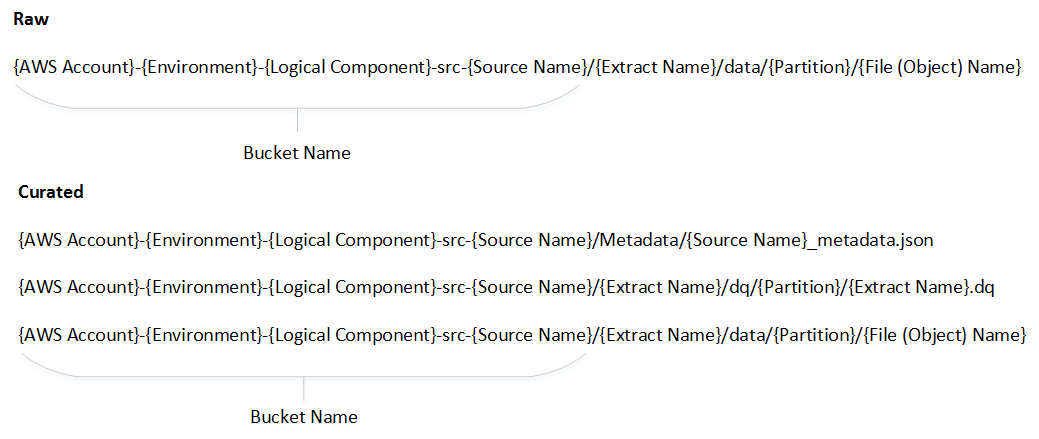
- The principles are broken down into separate sections for ease of understanding
- Bucket naming convention
- Extract naming convention
- Partition pattern
- File (Object) naming convention
Bucket Naming Convention:
- Bucket names must all be in small letters
- If a source has more than one word (like Sales Audit), then the words should be separated using an hyphen
- For Internal Systemic Sources (Like RMS 9, RSS, Product Services etc)
- There will be a list of such sources and owners maintained in Confluence
- Where the data is coming from a source system, then this will be the name of the source system
- If the data is made available as a service by the same source system, then it will sit in the same bucket as the source system
- If the service is being provided by another team which transforms the source data in anyway, then it is considered as another source
- Internal Non Systemic Sources (such as Budgets & Forecasts; Non Core Costs; GPOS Hierarchy)
- Where data is provided by a team (either on a regular basis or adhoc), then a bucket will be created based on the function of the team (for example – Finance, Marketing etc) to the level that all the files contained in the bucket have the same owner
- If the file comes from an external supplier, then there will be a bucket per external supplier
Extract Naming Convention:
- The Extract names must all be in small letters
- If the extract has more than one word (like Sales Audit), then the words should be separated using an hyphen
Partition Standard:
- The definition of the partition may differ between source systems
- The partition will typically be date based, for example, date the data is processed in ASPIRE or preferably the source systems trading date (aka RID date)
- Regarding RID, the recommendation is that the source system provides this date. For clarity this is not necessarily the actual date the data is processed in ASPIRE. The actual data contained in the extract file may span over multiple days – for example, in case of Sales Transactions from Sales Audit, the actual transaction day may span over 2 days. Similarly, extracts from JDA are taken at 9 PM, any changes after 9 PM comes through the next day. This will apply to periodic or adhoc extracts as well.
- Date partition will be in the YYYYMMDD format. If there are intra-day extracts, they will all go into the same folder. The physical name of the partition will explicitly have what the date refers to e.g. example partition formats are: load_date=YYYYMMDD or trading_date=YYYYMMDD
File (Object) Naming Convention:
- The Extract names must follow the same name as in the
- Where the source:
- is not a service AND
- an interface agreement exists between DACE and the source, then the name of the extract must have the following pattern irrespective of whether is source is systemic or not.
-
_<Date in YYYYMMDD_[HH24MISS]>_[Part Number]_ . - Where <Date in YYYYMMDD _[HH24MISS]> is the date that the extract corresponds to. The time part will be populated only for intra-day (or micro batch) files.
- For Intra-day batch files, the [Part Number] can also be used if you know specifically how many files are expected in a day or a single file has had to be split into multiple files e.g. due to file size. If part number is not used then it should be defaulted to 0. It is recommended to use either the Time or the Part Number and not both.
- The
is the number of times the source has resubmitted the specific extract file. In most cases, this will be 0. However, if there had been a failure and the source had to resend the file, then the sequence number is incremented when the file is resent. - The
can be any acceptable format.
- Where the
- source is a service OR
- When there is no interface agreement between the source and DACE then the name of the extract must have the following pattern
-
. where the file format can be XML or JSON
Logical Component:
RAW:
- Data from source is stored in its rawest form in this logical area
- Re-use existing buckets for sources which are in-scope
- See here for Interim Principles between Old and New Structures
- Create new RAW bucket for new sources
CURATED:
- In this logical area, the data from raw bucket is stored in various format with default to parquet format.
- Always create new curated set of buckets for the source
INFORMATION:
- In this logical area, the data from snowflake or other sources is stored in various format with default to parquet format The buckets in this logical area is classified into subject areas
Interim Principles between Old and New Structures {: #old_structures}
The following principles will be followed when deciding whether to create new buckets or to reuse existing buckets:
Raw Area
- Raw structures should remain as is where the files are in use, subject to other principles
- New sources will get new Raw structures
- If data is taken from existing raw for processing into Curated, then it must be in the original format as received.
- If data exists as both transformed & untransformed in the Raw area, then the data for the curated area will be taken from the untransformed instance.
- If data is not available in an untransformed format, then a change to that file feed will be investigated.
- If data is being accessed from the Raw area, and there is no downstream dependency, then this may be moved to a new structure if required; subject to reasonable analysis effort.
Curated Area
- All sources will get new Curated structures
Exceptions
Siesta - Manual Data Upload Solution
TL; DR
Siesta is the solution to the Manual Data Upload capability. It’s GitHub repo is here, link. It’s instrinsic nature means that it cannot adhere to the standard S3 bucket naming convention.
Instructions
The naming convention for Siesta S3 buckets is:
` siesta-{target AWS account}-[dev | preprd | prod]-RAW `
Rational
Siesta buckets are similar to S3 buckets, but differ in their deployment and behaviour. The similarities are:
- They are used to store data destined for Aspire
- They contain “raw” data that are uploaded by business users, similar to a
RawASPIRE bucket - They exist across multiple environments - dev, preprod and prod.
The key differences include:
- The source of data is from User Generated Content rather than a fixed data source
- This is data submitted by humans, rather than automated data pipelines
- Folder structure within a Siesta Bucket is simplified to accommodate non-technical users and users who do not have context of Data Tech processes.
- There are no curated buckets
- Access provided to buckets to business users is write-only.
- Buckets are provisioned automatically using the Siesta application.
- Buckets are hosted in a single account on behalf of other accounts
Migrated From Confluence
link Original Author : Chowdhury, Dan