Identifying Staging Data Increments Using Streams
urn:js:virtue:aspire:proposal:12.2
TL;DR
This proposal recommends that we use Snowflake streams over staging tables to identify new data for transform views to process.
Rational
By using streams we can simplify our transform view logic and standardise our approach across our ASPIRe data pipelines.
Solution Options
Logic embedded in the Transform View
The transform view is the window to the data we are going to process to the target as part of a transform unit. Where this view is built directly over a staging table it will be the full responsibility of the view to identify the new data to be processed as none of this logic should exist in the incremental models that insert/merge data to the target.
The following diagram shows the flow:
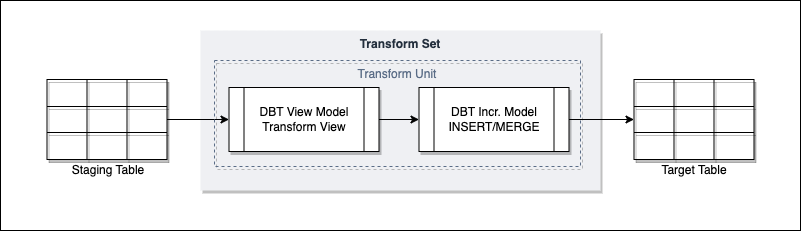
The following are the current strategies employed in both pipelines that follow the transform view pattern, and those that don’t where Snowflake streams are not used:
- We extract a recent tranche of data from the staging table (say the last 3 days) and then compare this to the target to see what data hasn’t been seen before. This can involve the use of hashes, keys or transaction dates compared between source and target which then identify data to be loaded downstream.
- We extract based on the LOAD_TS value and retain the value we have extracted up to, ready for the new run.
Both of these have been put in place to good effect but add complexity to the pipeline. Selecting an arbitrary amount of history to consider means we will have to sift through data we have already seen with performance being dependant on the frequency and volume of data being received. Holding dates to perform LOAD_TS increments requires additional reference data to manage and code to keep it up to date.
An alternative is to offload the identification to a Snowflake Stream.
Transform View over Snowflake Stream
A Snowflake stream sits over a table and tracks activity in that table. A stream can be either of type ‘Standard’ or ‘Append Only’ where the former tracks new, updated and deleted data whereas the latter new only. Streams can be queried directly and can be considered tables in their own right even thought they are effectively just pointers to the underlying table data rows.
Once DML acts on the data in a stream, the stream is effectively cleared down and will start to be populated with new activity from that point.
For this solution we would set the source of a transform view to be a Snowflake stream rather than the staging table itself. This way we offload the logic required to identify new data in the staging table from the transform view, to the Snowflake stream. The transform view will only need to ‘select all’ from the stream, and when that data is selected and inserted/merged into a target the stream will be cleared down ready for new data to come in.
Below is a diagram showing this solution proposal:
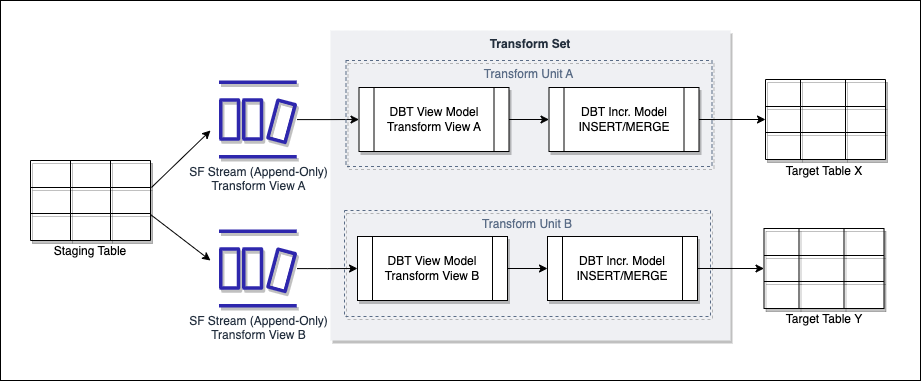
A couple of features of the above diagram need calling out:
- We can have multiple streams over a single staging table, each being the source for a different transform view - the rationale here is that we may be populating multiple objects from a single staging table, such as hubs, satellites and links. Each transform view may employ a slightly different strategy on the data in stream to make sure its target is updated correctly. For example, a transform view for a hub may compare to the target on business key only to identify new business keys to insert. A transform view for a satellite may use a hash_key built from all relevant columns to identify records in the stream that are not duplicates of what has already been loaded.
- The streams are of type append-only - this sits well with our principle of data immutability where staging data will only be updated for data retention processes, or soft delete. In both of these situations we would not want the updated records to be reflected in the stream. Append-only will only populate the stream with new data entering the staging table.
While there still will need to be logic in the transform view to select the right data to process, using a Snowflake stream removes the uncertainty of what is new data to consider and ensures it is the minimum.
Side note - when you create a stream on a table or view it invokes change tracking on that object. This is what informs the stream of what has been added or changed, and where the stream is up to in terms of offset. You can manually set change tracking on the object without a stream and use the CHANGES function to control what you extract from the table by date. This however is akin to the LOAD_TS approach where you need to hold and maintain reference data to know where you are up to, and also has disadvantages when looking to extract data that is older than the retention period set on the table. It is therefore not considered as an option.
Implications
The following need considering if this proposal is taken forward.
Reloads
We may need to reload data time to time, either by reprocessing unchanged staging data due to downstream transformation logic changes, or where data has been resent from source due to a change/fix.
For data resent from source this works well with streams as it will be new data entering the staging table so will appear in the stream due to being append-only. Where we need to reprocess existing staging data we will need to force the data back into the stream.
For both soft-delete of staging data will need to be performed. This will be via update of the staging table and the RECORD_DELETED_FLAG field.
To reprocess existing staging data, the proposal is as follows. This may need to be agreed via separate decision but is included here for completeness:
Extract the data to reload into a temporary table. Update the RECORD_DELETED_FLAG to ‘true’ for all data extracted to the temporary table. Clear out or prepare any data in downstream layers that are being replaced by the data being reloaded Load the data in the temporary table back into the staging table - this will then populate the stream. This may required batching depending on volume.
One challenge with this is whether you need to, or can, stall the population of the staging table with new source data. Any new data hitting the staging table will end up in the stream which could in theory get mixed with historic data being reloaded. This may lead to additional considerations around whether past and new data can be processed in the same batch but being able to do this would be an ideal position to be in.
Reload DQ
If we move to a synchronous, demand-driven Snowbocrop that sources from transform views we will see duplication (but perhaps improvement) in DQ metrics. This will require some consideration from a Snowbocrop front to ensure we do not skew DQ reporting.
Deploying streams
Streams will need to be created and managed somewhere so we will need to agree where the DDL sits. As each stream will be transform view specific and are therefore specific to, and are a dependency for a data product it feels like the GRID data product repo’s are the right place to manage them.
Where should streams be deployed
If we want to consume a single set of staging data for multiple environments we should consider placing the stream in the transform schema as opposed to the staging schema. This will allow us to point the stream at the specific environment staging schema we are taking data from as opposed to deploying environment specific streams in the staging schema.
If the stream is managed in the GRID repo we can look at ways to dynamically configure it to source from the required environment, which may require a create or replace of the stream to repoint it.